The Truth About the MacBook Air 13 M1 2020: Pros, Cons, and Verdict
Introduction
The MacBook Air 13 M1 (2020) landed as one of the most talked-about laptops in Apple's history: a thin, fanless chassis coupled with Apple’s first consumer silicon for Mac. For many buyers it represented a step change in performance-per-watt, battery life, and everyday responsiveness compared with the Intel-based Air models that preceded it. Four years on, it still shows up in buying conversations, used-laptop marketplaces, and as a recommendation for certain user groups.
This article examines the MacBook Air 13 M1 2020 in practical terms: what it does well, where it falls short, and which buyers should consider it today. The goal is to give readers the kind of hands-on, use-case-driven analysis people actually care about when deciding whether to buy, keep, or replace this machine.
Overview and key specifications
At a glance, the M1 MacBook Air combines a compact 13.3-inch Retina display with Apple’s M1 system-on-chip, a fanless design, and Apple’s macOS ecosystem. Typical base configurations when new were: an Apple M1 chip with an 8‑core CPU and either a 7‑core or 8‑core GPU, 8GB or 16GB of unified memory, and SSD options starting at 256GB. The machine weighs roughly 1.29 kg (about 2.8 lbs) and offers two Thunderbolt/USB‑4 ports plus a 3.5 mm headphone jack.
Those spec lines matter because they directly affect how the laptop behaves for everyday tasks, creative work, and more demanding workflows. Below, the review breaks down how those parts perform in real-world scenarios and which trade-offs buyers should expect.
Real-world performance and everyday use
Day-to-day responsiveness: The M1 chip transformed the typical Air experience. For email, web browsing with many tabs, note-taking, document editing, and light multitasking, the M1 Air feels snappy. macOS launches and resume times are quick, and apps optimized for Apple Silicon often outperform their Intel-era equivalents. For students and office workers who primarily run browser-based productivity suites, Slack, and Zoom, the M1 Air is more than capable.
Creative work (photo and light video editing): Photo editing in apps like Photos, Pixelmator, Affinity Photo, and even Photoshop (Apple Silicon native or via Rosetta 2 where supported) is comfortable on the Air. Batch exports and edits are faster than Intel Airs, but for large RAW archives or heavy Lightroom catalogs, the base 8GB memory and mid-range SSD throughput can show limits. For short-form video edits (quick cuts, color correction, and exports of 1080p material), the M1 Air handles the workload well; sustained 4K editing or heavy multicam projects are better suited to machines with active cooling and higher memory counts.
Development and coding: For web developers, mobile developers, and many software engineers who run code editors, local servers, and containerized tasks, the M1 Air is an efficient and pleasant tool. Compilation times for small-to-medium codebases benefit from M1 performance improvements, but very large builds or heavy virtualization (multiple VMs) will be constrained by memory and the Air’s single external display support. Lightweight Docker use and local Node, Python, or Ruby workflows are generally fine.
Gaming and 3D workloads: Gaming is not a primary strength. Apple Silicon enables better integrated GPU performance than previous Intel integrated graphics, and casual or indie titles run acceptably. However, AAA gaming, high-frame-rate 3D content creation, and GPU-accelerated simulations are outside the Air’s intended use case.
Battery life: One of the M1 Air’s headline benefits is battery life. In conservative, real-world mixed usage scenarios—web browsing, document editing, and streaming—users commonly observe long battery life that comfortably lasts a workday. Apple’s original claims (up to 15 hours of web browsing, up to 18 hours of video playback) translate to a practical advantage: fewer mid-day charges and better portability for travel or study sessions.
Thermals, sustained workloads, and the fanless design
The MacBook Air M1’s fanless chassis is a double-edged sword. It creates a silent machine that remains thin and light, but it also means sustained CPU-heavy tasks cause thermal throttling sooner than in fan-cooled machines. For bursty workloads—compilation, app launches, exporting short video clips—the Air delivers excellent results. For sustained, heavy compute tasks that keep all CPU cores pegged for long periods, performance will drop off as the system reduces clock speeds to manage temperature.
Shop the latest Laptops & Computers picks on Amazon.
Browse Now →Put simply: the Air is optimized for efficient everyday performance and short turbo bursts, not for prolonged workstation-level loads. Buyers who need long-duration high CPU or GPU throughput (continuous 3D rendering, long video encodes, scientific simulations) should look to fan-cooled laptops or desktop-class machines.
Display, keyboard, webcam, and audio
The 13.3-inch Retina display offers crisp text, accurate colors for most non-critical tasks, and good brightness for indoor use. Professionals who require color-critical workflows will want to calibrate or consider external color-accurate monitors. The Magic Keyboard on the M1 Air is reliable and comfortable for long typing sessions—an improvement over older butterfly-key models.
The FaceTime HD camera is 720p hardware, but Apple’s M1 image signal processor improves exposure, noise reduction, and tone mapping compared with older Intel models. The speakers deliver better than expected stereo sound for meetings and casual media consumption; they won’t match dedicated external speakers or larger laptop speaker systems, but they’re competent for video calls and streaming.
Ports and expandability
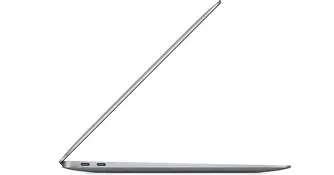
Port selection is minimal by contemporary standards: two Thunderbolt/USB‑4 ports and a headphone jack. There is no built-in SD card reader, HDMI, or multiple USB-A ports, so many buyers need one or more adapters or a dock to connect to legacy peripherals, external monitors, or wired networks. External display support is limited to a single external monitor (up to 6K at 60Hz), which is an important constraint for users who rely on multi-monitor setups.
Internal upgrades are not possible: RAM and storage are soldered to the logic board. That makes initial configuration choices (8GB vs 16GB memory, storage capacity) much more consequential. Buyers should select the highest reasonable memory and storage configuration they can afford at purchase if longevity and heavier workflows are anticipated.
Software ecosystem and longevity
One of the M1 platform’s strengths is its tight integration with macOS and growing app support for Apple Silicon. Many mainstream apps are now native, and Rosetta 2 provides excellent compatibility for Intel-only apps. In terms of longevity, the machine benefits from Apple’s continued support for Apple Silicon Macs, and M1 models remain supported by macOS updates longer than prior transitions suggested. Still, potential buyers should weigh how long they want their machine to receive feature updates and security patches when deciding between a used M1 Air and a newer model.
Pros & Cons
- Pros:
- Excellent daily performance: snappy responsiveness for web, office, and light creative work.
- Long battery life: real-world endurance that outpaces many previous ultraportables.
- Silent operation: fanless design means no active noise under light-to-moderate use.
- Compact and lightweight: easy to carry for students, commuters, and frequent travelers.
- Strong integration with macOS: growing native app ecosystem for Apple Silicon.
- Cons:
- Sustained thermal limits: performance drops under long CPU/GPU heavy loads due to no fan.
- Limited ports: only two Thunderbolt/USB‑4 ports and no SD/HDMI; adapters or docks often required.
- Memory and storage fixed at purchase: no user upgrades—choose wisely up front.
- Single external display support: inadequate for professionals who rely on multiple monitors without workarounds.
- 720p webcam: improved by the M1 ISP but still behind some higher-resolution webcams.
Comparison: Where the M1 Air sits in the lineup
| Model | CPU / GPU | RAM options | Storage | Ports | Fan | External displays | Best for |
|---|---|---|---|---|---|---|---|
| MacBook Air 13 M1 (2020) | M1 8‑core CPU, 7/8‑core GPU | 8GB / 16GB unified | 256GB–2TB SSD | 2 × Thunderbolt / USB‑4, 3.5mm jack | No (fanless) | 1 external display (up to 6K) | Students, everyday users, light photo/video editors |
| MacBook Air 13 (Intel, 2020) | Intel Core i3/i5/i7 (10th gen) | 8GB / 16GB | 256GB–2TB SSD | 2 × Thunderbolt 3, 3.5mm jack | Yes | 1 external display (or more with eGPUs historically) | Legacy support, some Windows via Boot Camp (Intel only) |
| MacBook Pro 13 M1 (2020) | M1 8‑core CPU, 8‑core GPU | 8GB / 16GB unified | 256GB–2TB SSD | 2 × Thunderbolt / USB‑4, 3.5mm jack | Yes | 1 external display | Users who want a bit more sustained performance and active cooling |
Buying guide: How to choose the right M1 Air (or decide against it)
Define the primary use
Start by listing the tasks the laptop must handle daily. If the primary needs are browsing, productivity apps, Zoom calls, streaming, and occasional photo edits, the M1 Air is a strong, budget-friendly option. If the workflow includes heavy video editing, large Lightroom catalogs, advanced 3D work, or sustained compilation jobs, consider a fan-cooled MacBook Pro, a later-generation Apple Silicon Mac, or a desktop.
Memory and storage choices
Memory: Choose 16GB if the budget allows and the buyer plans to keep the laptop for multiple years, works with large files, or runs many simultaneous apps and browser tabs. The unified memory design improves efficiency but cannot be upgraded later.
Storage: 256GB fills quickly when working with media files or large app libraries. Opt for 512GB or higher if possible. If budget concerns push toward smaller storage, plan to supplement with cloud storage or a fast external SSD for media and archives.
Port needs and accessories
Plan for a dock or a small USB‑C hub if peripherals (USB-A devices, HDMI monitors, SD cards) are required regularly. For users who travel with a single USB‑C charger, remember that the Air charges via its Thunderbolt ports, so choose an appropriately rated charger and cable.
Looking for the best Laptops & Computers deals on Amazon?
View Offers →Used and refurbished purchases
When buying used or refurbished M1 Air units, check battery cycle count, physical condition, and whether the unit has a valid Apple warranty or AppleCare coverage. Verify that the SSD and memory configurations match expectations, and confirm the unit boots into macOS without firmware or activation locks. Because repairs and upgrades are limited, mechanical or battery issues can be costly to resolve.
External monitor and multi-display considerations
If the user depends on multiple external monitors, M1 Air’s single external display support is a constraint. Some users work around this with DisplayLink adapters or docking stations, but those setups can be more complex and may introduce driver compatibility considerations. For a native multi-monitor experience, consider a different Mac model that explicitly supports multiple external displays.
Longevity and resale
M1 Airs hold value reasonably well because of the strong performance per watt and Apple’s long OS support. Buying a higher-memory or higher-storage model improves future-proofing and resale value. Conversely, the base 8GB/256GB units are more budget-friendly but may feel limited sooner for heavier users.
Who should buy the M1 Air in 2026?
Although newer Apple Silicon generations exist, the M1 MacBook Air remains an excellent choice for a wide range of buyers:
- Students who want a light, long-lasting laptop for note-taking, research, and media consumption.
- Remote workers who rely on web apps, communication tools, and productivity suites.
- Content creators doing light photo editing and short video projects who value portability and battery life.
- Developers working on small-to-medium projects and wanting a quiet, responsive machine.
It is less suitable for buyers who need sustained heavy compute performance, native multiple external displays, frequent high-end gaming, or upgradeable hardware.
Verdict
The MacBook Air 13 M1 2020 is an important milestone in laptop design: it shows how much performance and battery life can be achieved in a thin, silent package when hardware and software are closely integrated. For many real-world buyers—students, everyday users, and creators with moderate demands—the Air remains a compelling value proposition, especially on the used and refurbished markets.
However, the Air’s fanless design and limited ports create clear boundaries. Users who expect sustained high-load workloads or rely on multiple external monitors should evaluate other options. When choosing an M1 Air, prioritize the highest reasonable memory and storage configuration the budget allows, check the machine’s condition and battery health if buying used, and consider the accessory ecosystem (docks, external SSDs, chargers) that will help the laptop meet daily needs.
In short, the MacBook Air 13 M1 2020 delivers superb everyday performance, exceptional battery life, and an ultra-portable form factor—so long as buyers accept its design trade-offs and select the right configuration for their intended use.